CrowdSec Cloudflare Worker Bouncer



📚 Documentation💠 Hub💬 Discourse
This remediation component heavily relies on Cloudflare Workers and KV store. It won't work without a paid Workers subscription.
After configuring and starting the remediation component, please see the setting up worker fail mode section.
This remediation component deploys Cloudflare Worker in front of a Cloudflare Zone/Website, which checks if incoming request's IP address/Country/AS is present in a KV store and takes necessary remedial actions. It also periodically updates the KV store with CrowdSec LAPI's decisions.
Installation
Using packages
Packages for crowdsec-cloudflare-worker-bouncer are available on our repositories. You need to pick the package accord to your firewall system :
- Debian/Ubuntu
- RHEL/Centos/Fedora
sudo apt install crowdsec-cloudflare-worker-bouncer
sudo yum install crowdsec-cloudflare-worker-bouncer
Then run the following commands to setup your bouncer:
sudo crowdsec-cloudflare-worker-bouncer -g <CLOUDFLARE_TOKEN1>,<CLOUDFLARE_TOKEN2> -o /etc/crowdsec/bouncers/crowdsec-cloudflare-worker-bouncer.yaml # auto-generate cloudflare config for provided space separated tokens
sudo vi /etc/crowdsec/bouncers/crowdsec-cloudflare-worker-bouncer.yaml # review config and set `crowdsec.lapi_key` if haven't alread
sudo systemctl start crowdsec-cloudflare-worker-bouncer # the bouncer now syncs the crowdsec decisions with cloudflare components.
Please configure your server to emit real IPs rather than cloudflare IPs in logs, so crowdsec can function properly. See how to here
If your bouncer is not installed on the same machine than LAPI, don't forget to set the crowdsec_lapi_url and crowdsec.lapi_key in the configuration file /etc/crowdsec/bouncers/crowdsec-cloudflare-worker-bouncer.yaml
You need to run sudo crowdsec-cloudflare-worker-bouncer -d to cleanup exisiting cloudflare components created by bouncer before editing the config files.
You can run sudo crowdsec-cloudflare-worker-bouncer -g <CLOUDFLARE_TOKEN1>,<CLOUDFLARE_TOKEN2> -o /etc/crowdsec/bouncers/crowdsec-cloudflare-worker-bouncer.yaml to generate the configuration by discovering all the accounts and the zones associated with the provided tokens.
Manual Installation
Assisted
Download the latest release.
tar xzvf crowdsec-cloudflare-worker-bouncer.tgz
cd crowdsec-cloudflare-worker-bouncer/
sudo ./install.sh
sudo crowdsec-cloudflare-worker-bouncer -g <CLOUDFLARE_TOKEN1>,<CLOUDFLARE_TOKEN2> -o /etc/crowdsec/bouncers/crowdsec-cloudflare-worker-bouncer.yaml # auto-generate cloudflare config for provided tokens
sudo vi /etc/crowdsec/bouncers/crowdsec-cloudflare-worker-bouncer.yaml # review config and set `crowdsec.lapi_key` if haven't already
sudo systemctl start crowdsec-cloudflare-worker-bouncer # the bouncer now syncs the crowdsec decisions with cloudflare components.
From source
⚠️ requires go >= 1.20
git clone https://github.com/crowdsecurity/cs-cloudflare-worker-bouncer
cd cs-cloudflare-worker-bouncer
make build
./crowdsec-cloudflare-worker-bouncer -g <CLOUDFLARE_TOKEN1>,<CLOUDFLARE_TOKEN2> > cfg.yaml # auto-generate cloudflare config for provided space separated tokens
sudo vi /etc/crowdsec/bouncers/crowdsec-cloudflare-worker-bouncer.yaml # review config and set `crowdsec.lapi_key` if haven't alread
./crowdsec-cloudflare-worker-bouncer -c cfg.yaml # run the bouncer
Configuration
crowdsec_config:
  lapi_key: ${API_KEY}
  lapi_url: ${CROWDSEC_LAPI_URL}
  update_frequency: 10s
  include_scenarios_containing: []
  exclude_scenarios_containing: []
  only_include_decisions_from: []
  insecure_skip_verify: false
  key_path: ""  # Used for TLS authentification with CrowdSec LAPI
  cert_path: "" # Used for TLS authentification with CrowdSec LAPI
  ca_cert_path: "" # Used for TLS authentification with CrowdSec LAPI

cloudflare_config:
    accounts:
        - id: <ACCOUNT_ID>
          zones:
            - zone_id: <ZONE_ID> # crowdflare.co.uk
              actions: # Supported Actions [captcha, ban]
                - captcha
              default_action: captcha # Supported Actions [captcha, ban, none]
              routes_to_protect: []
              turnstile:
                enabled: true
                rotate_secret_key: true
                rotate_secret_key_every: 168h0m0s
                mode: managed # Supported Modes "managed"|"invisible"|"non-interactive"
          token: <CLOUDFLARE_ACCOUNT_TOKEN>
          owner_email: owner@example.com

log_level: info
log_media: "stdout"
log_dir: "/var/log/"
ban_template_path: "" # set to empty to use default template

prometheus:
    enabled: true
    listen_addr: 127.0.0.1
    listen_port: "2112"
Cloudflare Configuration
Background: In Cloudflare, each user can have access to multiple accounts. Each account can own/access multiple zones. In this context a zone can be considered as a domain. Each domain registered with cloudflare gets a distinct zone_id.
For obtaining the token:
- Sign in as a user who has access to the desired account.
- Go to Tokens and create the token.
The bouncer requires the follwing permissions to function.
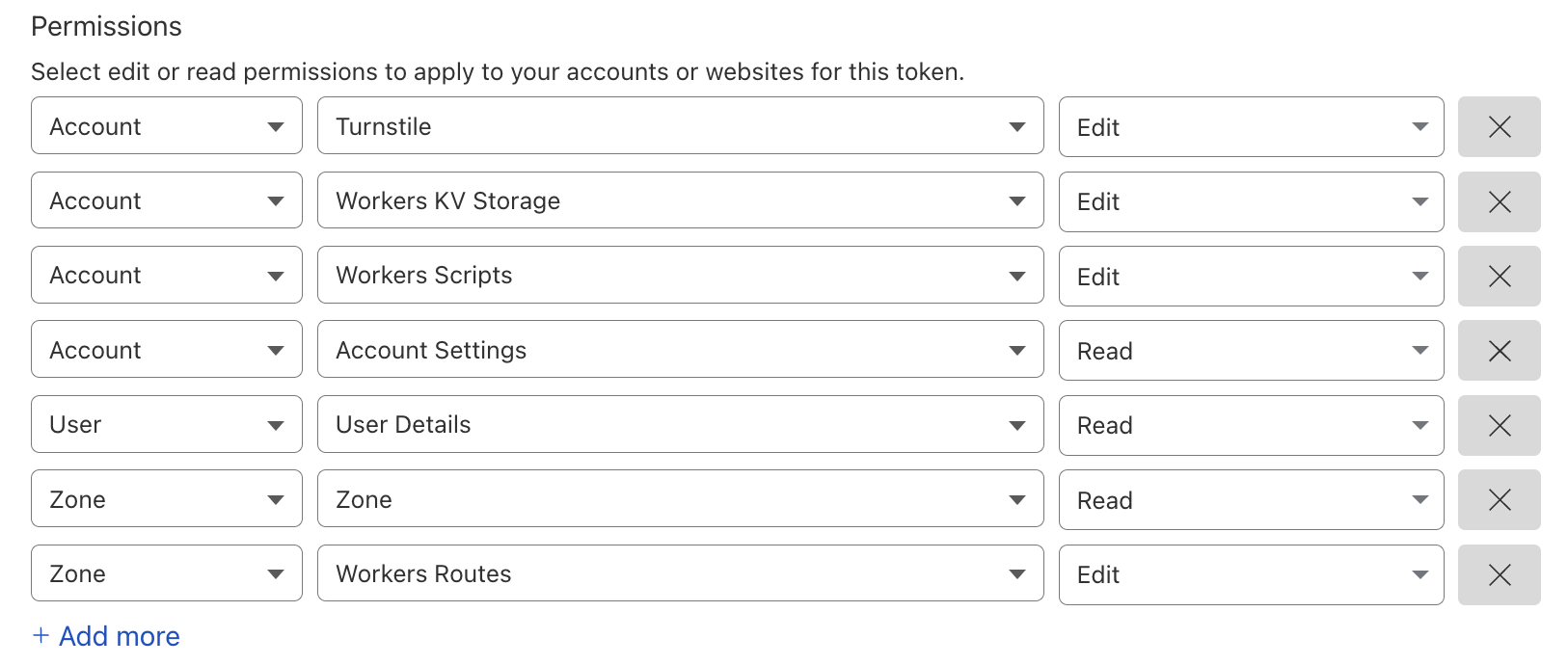
To automatically generate config, check the helper section below.
Helpers
The binary has built in helper scripts to do various operations.
Auto config generator
Generates config by discovering all the accounts and the zones associated with provided list of tokens.
Example Usage:
sudo crowdsec-cloudflare-worker-bouncer -g <TOKEN_1>,<TOKEN_2>...  -o cfg.yaml
cat cfg.yaml  > /etc/crowdsec/bouncers/crowdsec-cloudflare-worker-bouncer.yaml
This script only generates cloudflare related config. By default it refers to the config at /etc/crowdsec/bouncers/crowdsec-cloudflare-worker-bouncer.yaml for crowdsec configuration.
Using custom config:
sudo crowdsec-cloudflare-worker-bouncer -c ./cfg.yaml -g <TOKEN_1>,<TOKEN_2>...
Cloudflare Cleanup
This deletes all the Cloudflare infrastructure which was created by the bouncer.
Example Usage:
sudo crowdsec-cloudflare-worker-bouncer -d
How it works
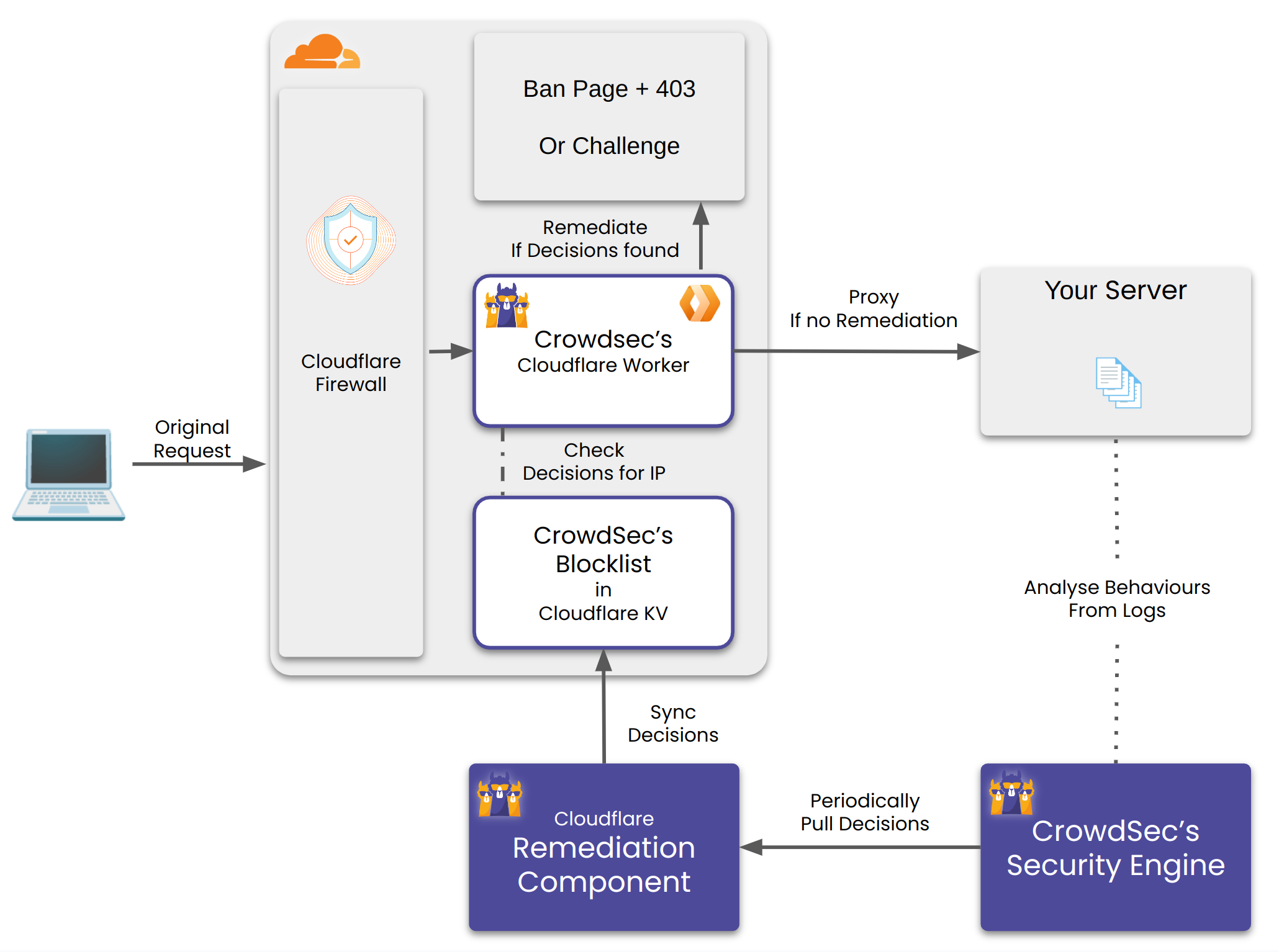
The bouncer does the following:
- Create a Cloudflare Worker and a Worker KV per configured account.
- Create a Worker Route(s) per configured zone. Any request matching the route would be handled by the worker.
- For every matching incoming request, the worker checks whether it's IP, Country and AS have a decision against. It checks for this in it's KV store. If found it performs the corresponding remediation.
- The bouncer also periodically updates the KV store with the latest decisions from CrowdSec.
Setting up the worker route fail mode
The remediation component creates worker routes to make the workers act as a reverse proxy for your origin servers. The worker routes are created with the failover mode set to Fail Closed. There's no public Cloudflare API we can use to change/update it to Fail Open mode.
With Fail Closed mode, Routes in fail closed mode will display a Cloudflare 1027 error page to visitors if there's an error within the worker. This error could be triggered due to quotas exceeding your plan etc. Cloudflare doesn't mention all the possible scenarios which could trigger this error page.
Thus we recommend you to manually override the failover mode to Fail Open for all the worker routes created by our remediation component. With Fail Open mode the requests would bypass the worker and be served directly from your origin servers. Thus your website would continue to function even if there's an error within the worker.
This can be done by following the steps below:
- Log in to the Cloudflare dashboard and select your account.
- For all the websites configured with the remediation component, do the following:
- Click on the website's name to open the Website's Overview page.
- Click on the Worker Routes tab from the left menu.
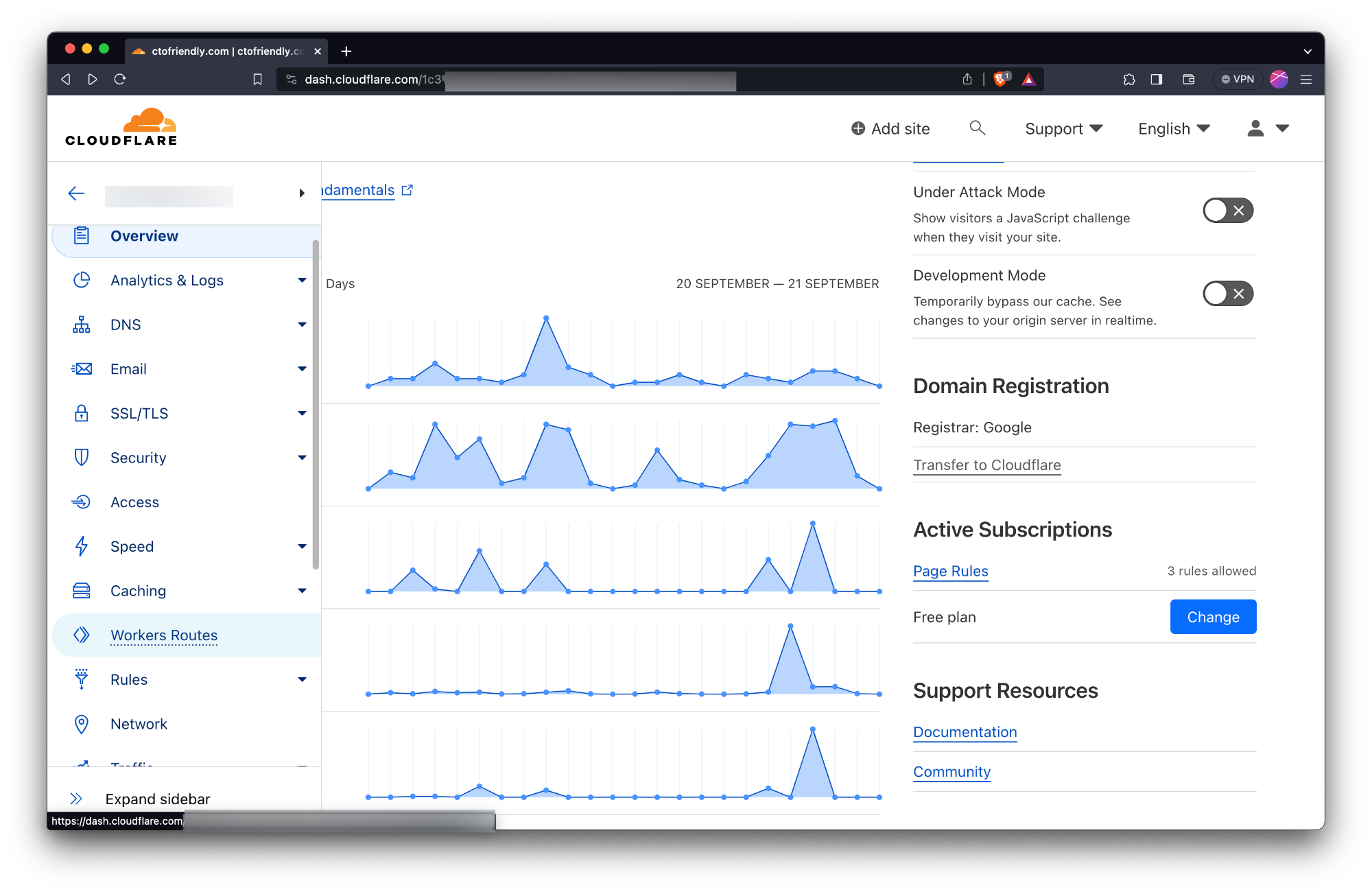
- Click on the route created by the remediation component.
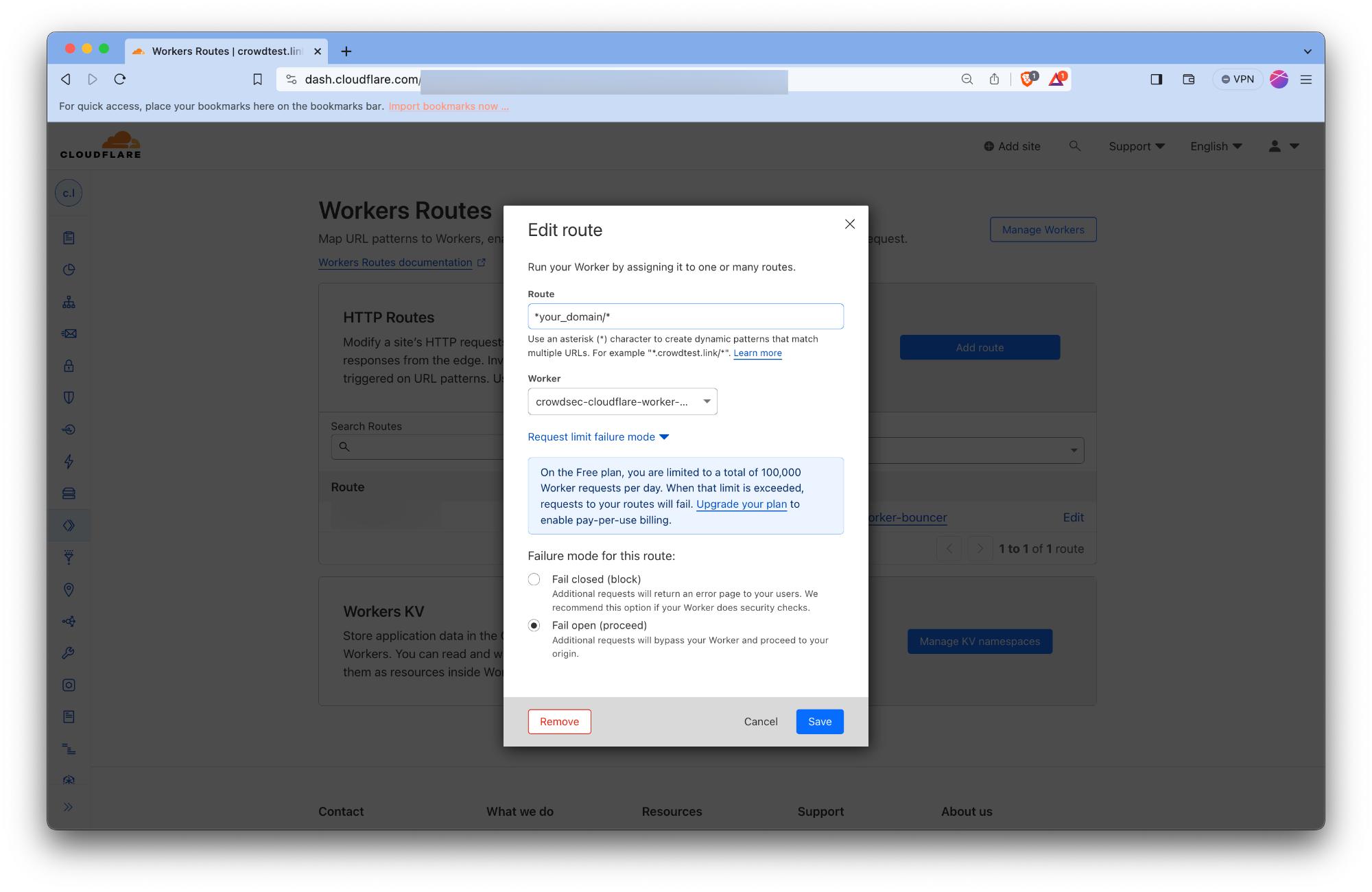
- Click on the Edit button.
- Click on the Request limit failure mode. Check the Fail open button.
Configuration Reference
crowdsec.lapi_url
The URL of CrowdSec LAPI. It should be accessible from the bouncer.
crowdsec.lapi_key
It can be obtained by running the following on the machine CrowdSec LAPI is deployed on.
sudo cscli -oraw bouncers add cloudflarebouncer # -oraw flag can discarded for human friendly output.
crowdsec.update_frequency
The bouncer will poll the CrowdSec every update_frequency interval.
crowdsec.include_scenarios_containing
Ignore IPs banned for triggering scenarios not containing either of provided word. Example value ["ssh", "http"]
crowdsec.exclude_scenarios_containing
Ignore IPs banned for triggering scenarios containing either of provided word. Example value ["ssh", "http"]
crowdsec.only_include_decisions_from
Only include IPs banned due to decisions orginating from provided sources. eg value ["cscli", "crowdsec"]
crowdsec.insecure_skip_verify
Skip TLS verification when connecting to CrowdSec LAPI.
crowdsec.key_path
Path to the private key file to use for TLS authentication with CrowdSec LAPI.
crowdsec.cert_path
Path to the certificate file to use for TLS authentication with CrowdSec LAPI.
crowdsec.ca_cert_path
Path to the CA certificate file to use for TLS authentication with CrowdSec LAPI.
cloudflare_config.accounts[].id
The ID of the Cloudflare account.
cloudflare_config.accounts[].zones[].zone_id
The ID of the Cloudflare zone.
cloudflare_config.accounts[].zones[].actions
Supported actions for the zone. Supported values ["captcha", "ban"]
cloudflare_config.accounts[].zones[].default_action
Default action to take for the zone. Example value ["captcha", "ban", "none"]
cloudflare_config.accounts[].zones[].routes_to_protect
List of routes to protect within the zone. Example value ["example.com/"]
cloudflare_config.accounts[].zones[].turnstile.enabled
Enable or disable turnstile for the zone. Example value true or false
cloudflare_config.accounts[].zones[].turnstile.rotate_secret_key
Rotate the secret key for turnstile. Example value true or false
cloudflare_config.accounts[].zones[].turnstile.rotate_secret_key_every
Duration for rotating the secret key. Values should be in the format of 1h2m3s. Example value 168h0m0s for 7 days.
cloudflare_config.accounts[].zones[].turnstile.mode
Mode for turnstile. Supported values ["managed", "invisible", "non-interactive"]. See cloudflare-docs for more details.
cloudflare_config.accounts[].zones[].token
Cloudflare account token.
cloudflare_config.accounts[].zones[].owner_email
Email address of the account owner.
ban_template_path
Path to the ban template file. If not provided, the default template is used. This HTML would be rendered to requests when they are banned.
log_level
Logging level. Either of info, debug, error, warning, trace .
log_mode
Logging mode. Either of stdout, file.
log_dir
Directory for log files.
prometheus.enabled
Enable or disable Prometheus metrics.
prometheus.listen_addr
Address to listen for Prometheus metrics. Example value 127.0.0.1
prometheus.listen_port
Port to listen for Prometheus metrics. Example value 2112
Troubleshooting
- Metrics can be seen at http://localhost:2112/metrics